

SYFT PRODUCT CARD
2026
REBUILDING A DESIGN SYSTEM THAT AI COULD ACTUALLY USE FROM THE GROUND UP

PROJECT OVERVIEW
SYFT’s product card was one component within a larger, collaborative design system. I owned the product-card experience and supporting system work, from defining its structure and visual behavior to exploring how it could scale across products, states, and screen sizes.
Working with a small design team responsible for other areas of the system, we developed our components toward a shared, code-ready foundation.
MY FOCUS
Product card design · Component architecture · Design systems · Responsive behavior · AI-assisted design and implementation
I owned the design and systemization of SYFT’s product card, tags, and badges, as well as glass morphism and soft elevation styles. I was in charge of component anatomy, variants, states, responsive behavior, and supporting visual rules.
I also explored how the human-authored design system could be translated into an AI-assisted workflow using intentional prompting and Cursor.
THE CHALLENGE
A product card looks simple, however, it needs to accommodate different products, imagery, information densities, states, interactions, and screen sizes while still feeling like the same component.
Our larger system needed to do more than look consistent in Figma. It needed to establish enough structure and specificity that the resulting designs could be implemented, reused, and extended without reinventing the rules each time.
That made the product card an ideal stress test:
Could we create a component that was flexible enough for real products, structured enough for a design system, and explicit enough for an AI agent to work with?
Role
UX/UI Design Intern →
Design Engineer Intern
Company
SYFT Fashion
Team
Nathan Proffitt - Design Lead
Arianne Poblete - Design Engineer Intern
Timeline
3 months

Tools


Product card, tags, badges, states & responsive behavior
48
Interaction and system considerations mapped
9
Participants in usability testing
MY CONTRIBUTIONS
Design → Code
Translated system constraints into an AI-assisted workflow + code
01: THE SYSTEM COMES FIRST
Defining product-card foundations and component logic.
I thought the system came first. I eventually learned there was another layer underneath it.
Our intern team divided ownership across the design system, building it from the ground up: and I took responsibility for the product card, tags, and badges components that would dominate SYFT’s primary browsing experience.
Because an existing beta library already contained colors, spacing, typography, and visual patterns, I initially treated those decisions as established constraints. My early work followed SYFT’s existing red, black, and white visual language.
What I didn’t realize yet was that the beta system itself was temporary.

Before designing the product card, I defined the visual and structural rules it needed to follow. Our design decisions needed to be explicit enough for AI to translate and implement.
The product card would become the primary interface and interaction pattern of SYFT. Once users are onboarded, their main experience is a personalized catalog of products, with information curated specifically for them.
This made the product card the foundation of the product experience, and a key opportunity to differentiate SYFT.
SYFT BETA Screen
Explore the problem space and what the component is solving for
Begin to identify user context/needs/pain points
Start conceptualizing solution directions
RESEARCH OBJECTIVES
RESEARCH INSIGHTS
I started by researching what people actually expect from a product card, and how they really interact with one:
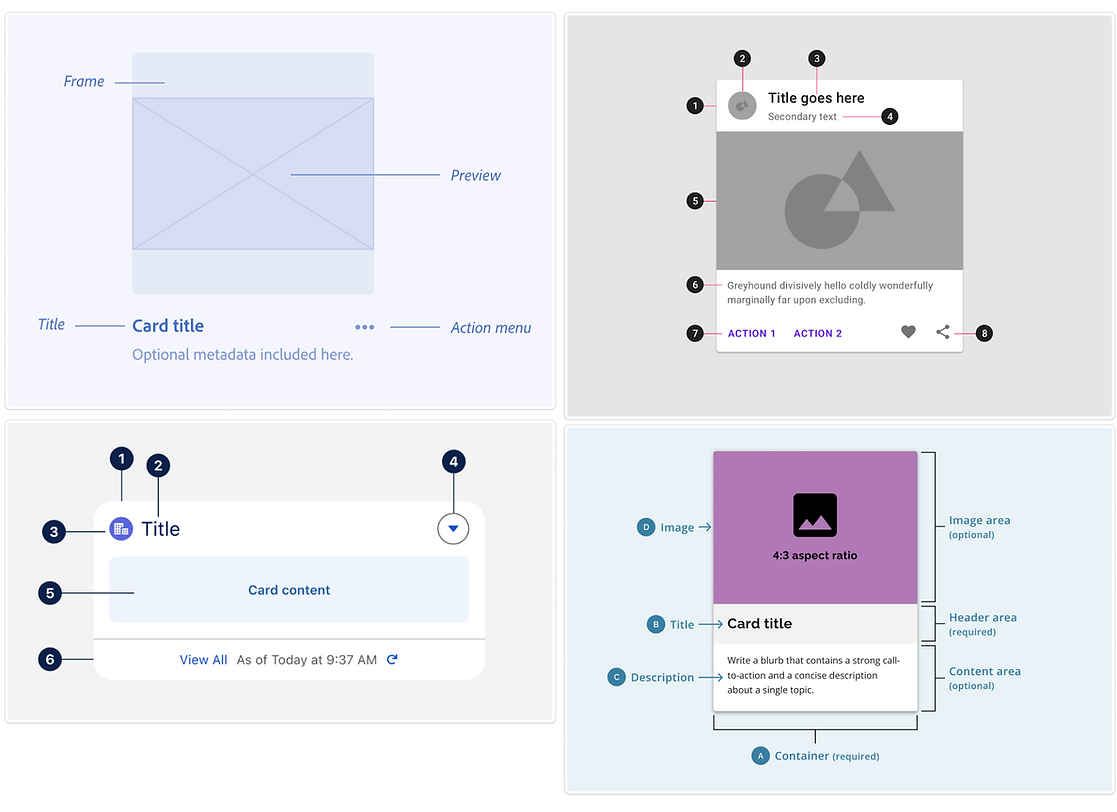
Users scan product cards rather than read them, preferring cards with 3–5 pieces of information
01
Cards with strong visual hierarchy perform better, &
whitespace improves perceived quality
02
Poor quality or inconsistent sizing for images causes users to skip cards entirely, even for products they'd want.
03
Image and price are processed before description
Users hover over cards to preview
04
USER CONTEXT
Gen-Z women who are trend-driven and social media savvy.
Naomi

21 year old college student and young professional, looking for fashion product that are her style, and match the trends that she follows.
Needs
-
Relevant information quickly
-
To find a product that fits her context
-
Less frustrations in her shopping experiences
-
A seamless experience
Wants
-
To see why a product is relevant to her needs
-
To know that she can trust the engine
-
To dress relevant and trend-driven

ANALYZING EFFECTIVE PRODUCT CARDS


PRIORITIZATIONS AND TRADEOFFS

INTERACTION CONTEXT
This map pulled every thread of research: user needs, existing context, and interaction flow - all into one view, and directly shaped layout, hierarchy, and card behavior.

Rather than designing each variation independently, I used these explorations to define which properties belonged to the component itself and which should remain flexible.
So much thinking goes into one small component.
What looks like a simple product card is actually a network of decisions about hierarchy, content, states, spacing, responsiveness, and reuse.
02: EXPLORATION AND DESIGN
Mapping, variants, states, content requirements, and responsive behavior.
FROM SKETCH TO WIREFRAME
I explored how the component's hierarchy, spacing, imagery, and information density should adapt across screen sizes while maintaining the same underlying structure: the goal was a component that could change context easily.
I sketched possible directions at modular heights to work through hierarchy and figure out the "atoms" inside the "molecule," pulled existing tokens (color, spacing, corner radius) from the established library, then built and tested hover states across variants.


WORKING IN PARALLEL CREATED DRIFT
We had divided component ownership to move quickly, but working independently introduced an unexpected problem: each of us was beginning to interpret SYFT differently.
The components worked individually, but together they weren’t speaking the same visual language.

THE FEEDBACK THAT RESET THE SYSTEM
Before development, we reviewed the system with our stakeholder and learned that her vision for SYFT had evolved. The red, black, and white flat aesthetic we had been designing toward was no longer the direction. She wanted the product to feel quieter, more premium, and more contemporary: primarily grayscale, with glassmorphism and soft elevation.
That feedback exposed a larger issue. Because we had been designing components somewhat independently, and because I had treated the beta library as a permanent foundation, our visual system had begun to fragment.
My product card research was still valid and the research was solid. Its hierarchy, information architecture, states, and responsive behavior still solved the same problems. What needed rebuilding was the visual foundation underneath it.
I thought the design system was the foundation. I learned that even a design system depends on shared decisions underneath it.
LIBRARY REFINEMENT
Rather than immediately reskinning the product card, we went one level deeper.
As a team, we aligned on typography and rebuilt the color library. I then owned defining the new glassmorphism and soft-elevation rules and applied them first to SYFT’s smaller tags and badges. Once those primitives were stable, I returned to the larger product card and rebuilt it on top of the new system.


Designing for an AI-driven build added a unique constraint: if precise documentation is expected for human engineers, hyper-specificity is absolutely critical when writing instructions for an AI.
BUSINESS POSITIONING: THE BADGES MEAN MORE THAN YOU THINK
During onboarding, users take a quiz to be assigned one to two styles that fit what they're looking for, as well as trends that fit into those styles in order to find exactly what they're looking for on retail platforms with tens of thousands of items. That's what differentiates SYFT from everyone else, and we had been putting the tags and badges on the sidelines when really, they're what matter most.
DEFINING STATES
The product card had to communicate different states such as hover, selected, focus, and empty, as well as the option to expand the amount of tags shown.

The product card in the Figma component library was the compiling of smaller components, interactions, and understandings. We now had specific ways to tackle long product titles, numerous tags, and legibility. It also directly communicated SYFT's business model: identifying styles and trends with clear badging and expandable tags.
I stress tested using Free People's' catalog and identifying the use of different badges, for the different styles, long titles, and different price points.
The goal was to find the edge cases early before they became exceptions in the system.
STRESS TESTING AGAINST A REAL CATALOG

03: THE AGENTIC WORKFLOW
Translated design-system constraints into intentional prompts and used Cursor for exploration and implementation.
A SECOND PIVOT: FROM HANDOFF TO IMPLEMENTATION
Later, a change in development resources created another constraint. In a startup environment where speed mattered, stakeholders asked the UX/UI team to move beyond traditional design handoff and help deliver coded components directly.
That raised the bar for the system. It could no longer merely communicate intent to another designer or developer: it needed to be explicit enough to produce repeatable implementation.
WORKING AI-IN-THE-LOOP
With Figma open on one side, a live AI coding agent open on the other, we started building against both at once as a team. Here's how we added AI into the process and worked alongside it:
Pull the real spec. Claude Code hits the Figma API directly, by node ID: reading the actual file, not a screenshot of it. This helps especially when prompting the AI.
Generate the component. Claude Code and Cursor write the real React component and its Storybook stories, straight from that spec.
Review it live. We check every state together.
We had to have an organized design system that defined every state up front, then checking the generated component against our system, state by state, catching and fixing when things didn't quite match up.

INTENTIONAL PROMPTING
Tokens are limited: constant back and forth is a waste of time and resources. Prompting with intentional language is key when working effectively with agentic systems - the quality of the output depended on how clearly the design system could be communicated.
"Code the product card component"
"Use the existing product-card component structure. Preserve the established spacing scale, type hierarchy, image ratio, interaction states, and responsive behavior. Do not introduce new visual tokens. Extend the existing component only where the product-content requirements cannot be met by current variants."
My job in this loop wasn't to write the agent's code. It was to make sure the agent was building the right thing.

THE CODED PROTOTYPE IN STORYBOOK
The final test was whether the system could survive outside of Figma.
Once the system was established, we used intentional prompting and Cursor to explore its translation into implementation.
Rather than asking the agent to independently design a solution, the design system gave it the structure, constraints, and visual rules it needed to work within.
I then evaluated the output against the original system, identifying where the implementation aligned, where it diverged, and where the system itself needed clarification.
The agent accelerated exploration. The design system provided the constraints. Human judgment remained the filter and the guidelines.
04: REFLECTION
DESIGNING FOR WHAT'S NEXT
This project changed how I think about AI in product design. The question isn't whether AI can produce a polished interface: we all know that it can.
However, the more valuable question is whether we can design the systems, constraints, and evaluation criteria that allow AI to contribute as though it's a partner within the team without compromising product thinking.
Excitingly, that puts more responsibility on the designer! We have to know what should be generated, what should be constrained, what should remain human, and how to recognize when an output is technically valid but fundamentally wrong.
The future of design isn't simply designing interfaces faster.
It's designing the systems that allow humans and intelligent tools to build better interfaces together.
I now truly understand the importance of a complete and organized system that is vast and specific. A system is only done when someone, human or AI, can build from it directly and effectively - That's the bar I hold my specs to now.
GALLERY
A showcase of other projects I did/contributed to for SYFT, including brand systems and logo ideating:


